top of page

Enhancing Comodo Free Firewall Sales Performance
(Redesign to Launch)

  Business Objective   
Increase downloads, lead generation, and paid conversions for Comodo Free Firewall by optimizing the landing page experience to better communicate value, build trust, and reduce friction in the user journey.
  Problem Statement  
The Comodo Free Firewall landing page failed to meet its business goals, showing low downloads, weak lead generation, and poor sales performance.
  Target Users  
  • Security-Aware Home User (Primary Persona)
  • Budget-Conscious Student / Freelancer (Primary Persona)
  • Small Business Owner / IT Generalist (Secondary Persona)
  Focused on the primary persona to uncover maximum insights, enabling solutions that addressed the majority of both user pain points and business challenges  
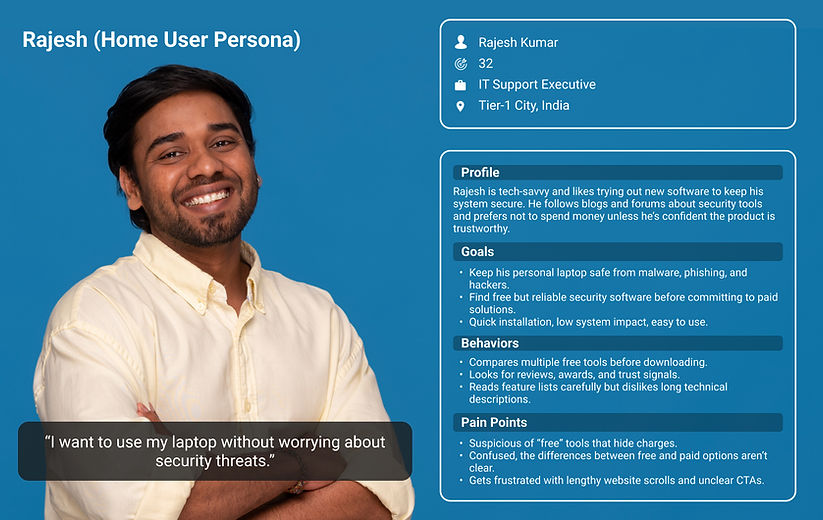
Rajesh (Home User Persona)   
rajesh.png
Name: Rajesh Kumar
Age: 32
Occupation: IT Support Executive
Location: Tier-1 City, India
Profile
Rajesh is comfortable with technology and often experiments with new software to keep his system safe. He reads blogs/forums about security tools and doesn’t want to spend money unless the product proves trustworthy.
Goals
  • Keep his personal laptop safe from malware, phishing, and hackers.

  • Find free but reliable security software before committing to paid solutions.

  • Quick installation, low system impact, easy to use.

Behaviors
  • Compares multiple free tools before downloading.

  • Looks for reviews, awards, and trust signals.

  • Reads feature lists carefully but dislikes long technical descriptions.

Pain Points
  • Suspicious of “free” tools that hide charges.

  • Confused when Free vs Paid differences aren’t clear.

  • Gets frustrated with lengthy website scrolls and unclear CTAs.

Sneha (Student/Freelancer Persona)   
sneha.png
Name: Sneha Patel
Age: 24
Occupation: Graphic Design Freelancer / Final-year Student
Location: Tier-2 City, India
Profile
Sneha uses her laptop daily for freelance design work and college projects. She has a limited income, so she prefers free tools. However, she wants assurance that the software is safe and won’t slow down her system.
Goals
  • Protect her device while working online.

  • Avoid spending money upfront on software.

  • Understand exactly what’s included in the free version.

Behaviors
  • Scan through websites quickly, focusing on headlines and CTAs.

  • Downloads software if the site looks credible and compatibility is clear.

  • Rarely reads long paragraphs — prefers quick comparisons.

Pain Points
  • Overwhelmed by technical jargon.

  • Distrusts websites that don’t show proof of credibility (reviews/awards).

  • Doesn’t know when it’s worth paying for an upgrade.

   User scenario for Rajesh (Home User Persona)   

Rajesh, a 32-year-old IT support executive, wants to protect his personal laptop from malware without spending money initially. He searches online for “best free firewall software” and lands on Comodo’s old website design. At first glance, he feels a little overwhelmed. The page is long and cluttered, and he struggles to quickly understand what the free version offers and how it differs from the paid version.

​

He scrolls down, trying to make sense of the content, but the information feels scattered. Some sections are filled with technical jargon, and the “Free Download” button is small and easy to miss. He wonders if the software is really trustworthy—there are few awards or certifications that should be visible (unfortunately, awards and certifications are buried at the end of the page), and nothing immediately reassures him that this free tool is safe to use.

​

As he continues, Rajesh becomes frustrated and a bit anxious, knowing he needs to secure his laptop quickly. Even though the information is confusing, the option to try the free version gives him a way forward. He decides to click “Free Download,” thinking that if the software works well and meets his needs, he can consider upgrading to the paid version later. This choice allows him to act despite the unclear presentation and limited trust signals.

   User scenario for Sneha (Student/Freelancer Persona)    

Sneha, a 24-year-old freelance graphic designer and student, wants to protect her laptop while working on online projects. She comes across Comodo’s old website through another friend. while looking for free firewall software. At first glance, the page feels empty, and there is enough information about the product, but nothing immediately tells her what she gets for free.
 

She starts scanning the information, hoping to quickly find the features she cares about, but the information is very less and filled with technical terms she doesn’t fully understand. The “Free Download” button isn’t prominent, so she has to hunt for it, which makes the process frustrating. She also notices there are almost no trust signals like awards or certifications, making her hesitate to download the software.


Sneha tries to figure out the difference between the free and paid versions, but quickly gets confused because there’s a comparison, but it's for another product. She worries about installing something that might not be compatible with her laptop or could slow down her work. Feeling impatient and frustrated at the same time, she convinced her because she needed immediate protection and tried to get a free version for now. if she needed more, maybe she would upgrade.

   Rajesh User Journey   
journey map - rajesh.png
   Sneha User Journey   
journey map - sneha.png
  Collage redesign solutions from Rajesh and Sneha User Journey   
  1. Awards, certifications, and credibility badges are displayed upfront.

  2. Side-by-side Free vs Paid comparison with clear features, pricing, and CTAs

  3. Strong, dual CTAs (“Free Download” + “Get Full Protection”), system requirements listed to reduce friction.

  4. First fold simplified → clear CTA, Windows version info, and product purpose explained in plain words.

  5. Visual blocks → “Why Comodo Firewall is Different” + “What’s Inside” sections with concise, benefit-driven text.

  6. Clean, prominent Free Download CTA supported by awards → instant trust

  Design Solution  
  First Fold  
   Before Revamp   
c1.png
   After Revamp   
v1.png

We designed it easy for users to take action by placing a clear and prominent “Free Download” button, along with straightforward information about Windows compatibility, so they wouldn’t have to second-guess whether the software would work. Showcasing the product’s award-winning credentials right away also helped build trust and reassure users that they were choosing a reliable solution.

​

At the same time, we added a thoughtfully positioned “Get Full Protection” button to guide users who were interested in upgrading, turning their curiosity into paid subscriptions. This approach educates users about the product and encourages conversions, ultimately leading to boosting leads and revenue.

  Second & Third Fold  
   Before Revamp   
c2.png
   After Revamp   
v2.png

At the very top, we showcase multiple international awards to instantly build credibility and appeal to users worldwide. Highlighting COMODO Firewall’s recognition from well-known organisations reinforces trust, showing that this is a proven, world-class security solution.
 

Further down, the content is designed to educate users about the product’s unique features and real benefits compared to other firewall options. The “Why Comodo Firewall is Different” section makes it easy to scan and understand whether someone is tech-savvy or just looking for straightforward answers.
 

The “What’s Inside Comodo Firewall” section goes a step further by clearly explaining functionality, security coverage, and compatibility, giving users peace of mind. By combining trust-building visuals, benefit-focused content, and simple educational explanations, the design creates a smooth flow that encourages both free downloads and paid conversions.

  Fourth Fold  
   Before Revamp   
c3.png
   After Revamp   
v4.png
In the fourth fold, we show a side-by-side comparison of the free and paid versions, so users can instantly see the differences in features and pricing. This makes it easier for them to understand the added value of the paid plan and make a confident decision. Clear CTAs—“Free Download” and “Get Full Protection” guide users toward the option that suits them best.

Below that, we provide detailed system requirements to make sure the software will work on their devices, reducing friction and preventing potential drop-offs.
   We ran A/B testing using a control page and a variation page to see which layout helped users make decisions more easily. Below are the metrics    
400% increased free download conversion
250% increased sales revenue
By making it easy for users to understand the value of the paid version and removing any hesitation, the design helped them confidently try the free version and consider upgrading to the premium plan.
   Full page view of control and variation design   
free-firewall-1.jpg
bottom of page